If you've worked with SAP OData Services, you've probably encountered this scenario:
- Authentication succeeds ✅
- Your endpoint is correct ✅
- The payload looks valid ✅
Yet every POST request returns:
403 Forbidden
The reason is usually not authentication.
It's CSRF Token Validation.
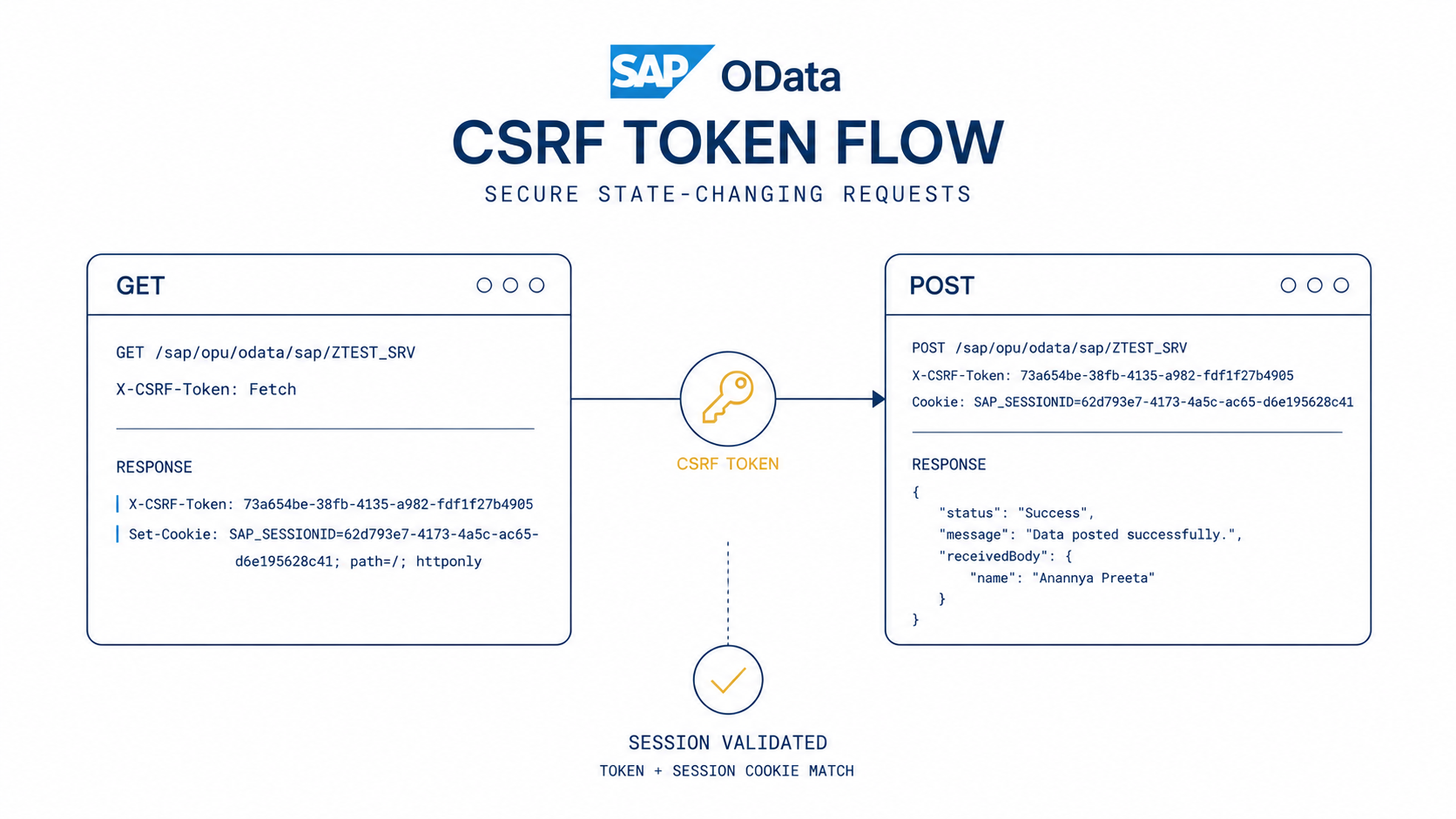
In this article, we'll explore what CSRF tokens are, why SAP uses them, and the request flow required to successfully perform state-changing operations.
What is a CSRF Token?
CSRF stands for Cross-Site Request Forgery.
It's a security mechanism that protects web applications from unauthorized requests made on behalf of an authenticated user.
Whenever a request modifies data, SAP Gateway requires proof that the request actually originated from the authenticated client.
Instead of relying solely on authentication, SAP issues a unique token that must accompany every request that changes data.
This applies to:
- POST
- PUT
- PATCH
- DELETE
How SAP's CSRF Flow Works
The process consists of two requests.
Step 1 — Request the CSRF Token
Before sending a POST request, send a GET request with the following header.
GET /sap/opu/odata/sap/ZTEST_SRV

X-CSRF-Token: Fetch
The value Fetch tells SAP Gateway to generate and return a CSRF token.
If the request succeeds, SAP returns:
X-CSRF-TokenSet-Cookie
The screenshot below shows the response in Postman.
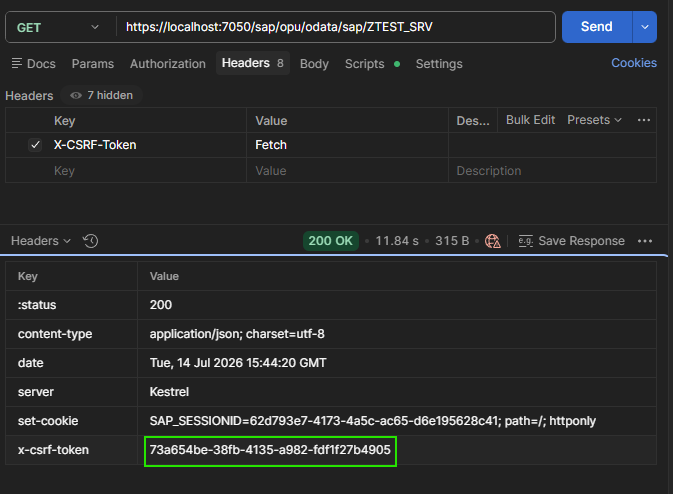
Notice the highlighted response header.
X-CSRF-Token:
73a654be-38fb-4135-a982-fdff1f27b4905
SAP also issues a session cookie.
Set-Cookie:
SAP_SESSIONID=...
Both values belong to the same authenticated session.
Why Is the Session Cookie Important?
A common misconception is that the CSRF token alone is enough.
It isn't.
SAP validates:
- the session cookie
- the CSRF token issued for that session
This prevents a valid token from being reused in another session.
If either value is missing or invalid, SAP rejects the request.
Step 2 — Send the POST Request
Once the token has been retrieved, include it in your POST request.
POST /sap/opu/odata/sap/ZTEST_SRV

Content-Type: application/json
X-CSRF-Token: 73a654be-38fb-4135-a982-fdff1f27b4905
Example request body:
{
    "name": "Anannya Preeta"
}
The completed request looks like this.
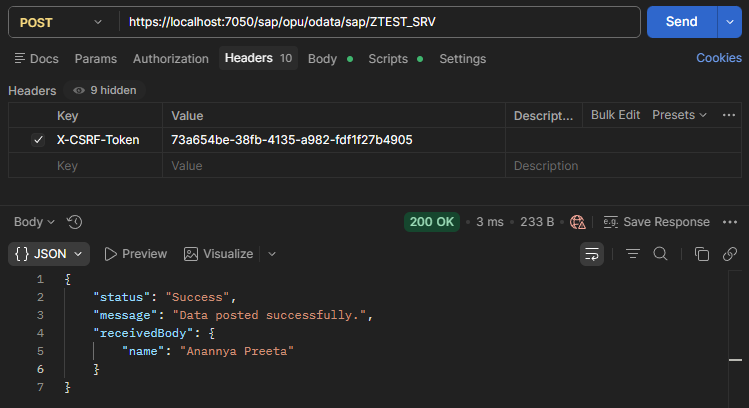
Because the request contains both the CSRF token and the session cookie, SAP validates the request and processes it successfully.
Understanding the Lifecycle
You can think of the process as a short-lived security pass.
Putting It All Together
The complete request flow looks like this:
- Authenticate with SAP.
- Send a GET request with
X-CSRF-Token: Fetch. - Receive both the CSRF token and the session cookie.
- Send the POST request with:
- the CSRF token
- the same session cookie
- SAP validates both before processing the request.
This two-step handshake is what prevents unauthorized state-changing requests while ensuring the request originates from the same authenticated session.
Using .NET to Fetch a CSRF Token
Fetching the token in .NET is straightforward using HttpClient.
using var request = new HttpRequestMessage(HttpMethod.Get, serviceUrl);

request.Headers.Add("X-CSRF-Token", "Fetch");

var response = await client.SendAsync(request);

var csrfToken = response.Headers
    .GetValues("X-CSRF-Token")
    .FirstOrDefault();
Once retrieved, include the token in subsequent requests.
var request = new HttpRequestMessage(HttpMethod.Post, serviceUrl);

request.Headers.Add("X-CSRF-Token", csrfToken);

request.Content = new StringContent(
    JsonSerializer.Serialize(payload),
    Encoding.UTF8,
    "application/json");

await client.SendAsync(request);
If you're using the same HttpClient with a CookieContainer, the session cookie is preserved automatically.
Common Causes of 403 Forbidden
If a POST request fails, check the following:
- The
X-CSRF-Tokenheader is missing. - The session cookie isn't being sent.
- The token belongs to another session.
- The token has expired.
- A new authentication session invalidated the previous token.
In most cases, fetching a fresh CSRF token resolves the issue.
Best Practices
When integrating with SAP OData services:
- Always fetch a CSRF token before state-changing requests.
- Preserve session cookies throughout the session.
- Handle expired tokens gracefully.
- Log request and response headers during development.
- Refresh the token after re-authentication.
Final Thoughts
CSRF token validation is a fundamental part of SAP OData's security model.
Although it introduces an additional step before modifying data, the overall process is straightforward:
- Authenticate.
- Fetch the CSRF token.
- Store the session cookie.
- Include both in every POST, PUT, PATCH, or DELETE request.
Understanding this lifecycle not only helps prevent 403 Forbidden errors but also makes troubleshooting SAP OData integrations significantly easier.
I hope this walkthrough helps clarify how SAP Gateway validates state-changing requests and serves as a useful reference the next time you're working with SAP OData services.
Happy coding!